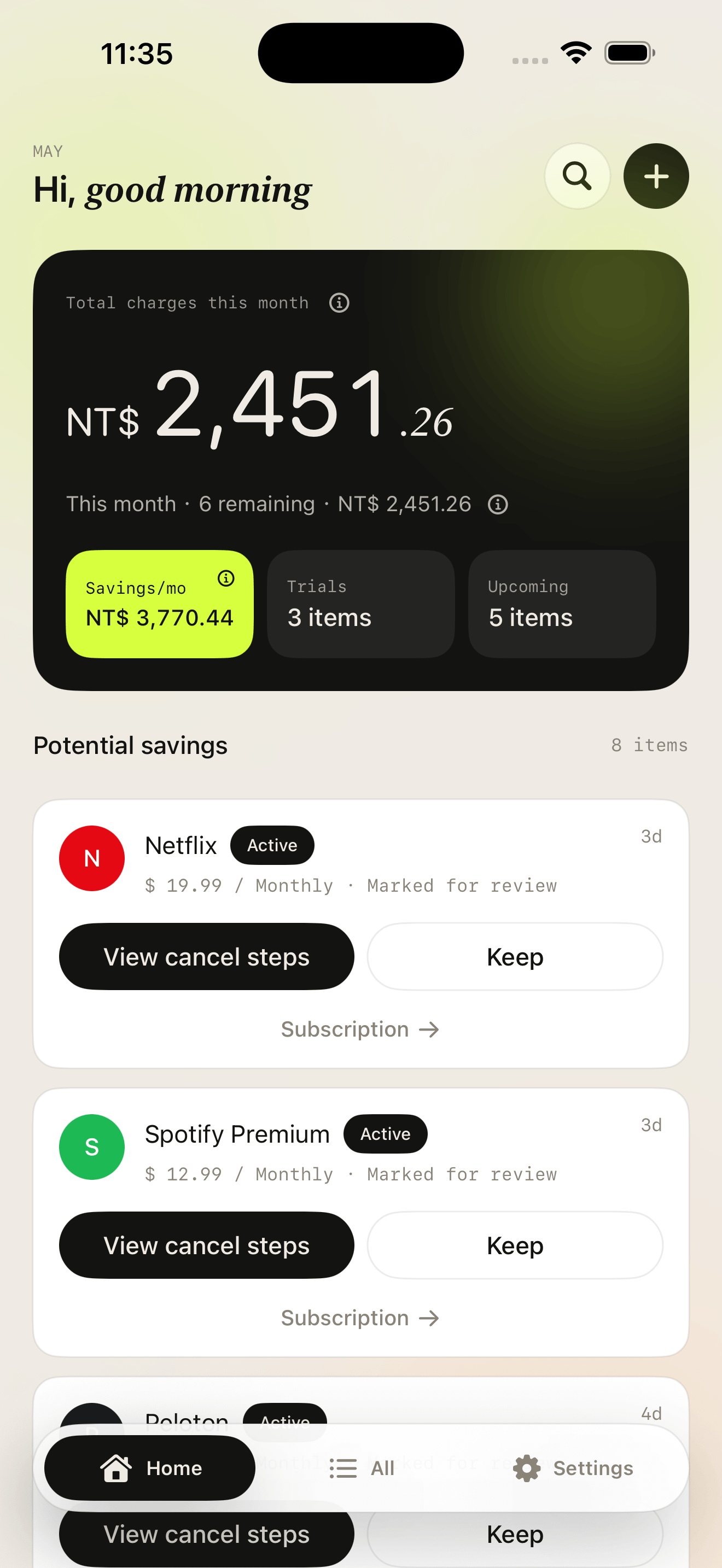
Monthly overview with potential savings.
See the current month total, remaining renewals, and subscriptions you marked for review as a monthly equivalent. It is a planning signal, not a promise.
RenewList turns subscriptions into a focused dashboard: upcoming charges, trials, reminders, and review decisions in one place. Your records stay on device.
Designed for manual tracking, screenshot assisted entry, and local reminders. RenewList records your decisions; it does not cancel external services for you.
Built around renewal decisions
The home screen focuses on three product states: subscriptions marked for review, active trials, and upcoming charges. Everything else stays in the archive.
See the current month total, remaining renewals, and subscriptions you marked for review as a monthly equivalent. It is a planning signal, not a promise.
Flag a subscription as reviewing, open cancellation steps, or keep it with one clear decision.
Global reminder presets apply when you add, edit, or import subscriptions, then clear when an item is canceled.
Filter by reviewing, upcoming, trial, active, canceled, high amount, or annual plan.
Start from common services, parse a screenshot, type one sentence, or enter every field manually.
Keep ownership of your records with JSON and CSV export, plus import paths for RenewList files.
Fast capture
RenewList keeps entry lightweight while still ending in a confirmation step, so the final record is something you trust.
Use the local catalog to prefill service details.
Select an image and review parsed fields before saving.
For example: "Netflix $15 monthly, renews on the 30th."
Use the complete form when you need full control.
RenewList is for people who want subscription visibility without connecting a bank account, inbox, or App Store account.
The app is built around manual records and assisted capture, not financial account aggregation.
Smart add helps parse subscription details, then the user confirms the record before it is saved.
RenewList can show cancellation steps and record the result, but it does not cancel external services on your behalf.
JSON and CSV export make your subscription archive portable when you need a backup.
Renewal review
The app keeps status simple: trial, active, or canceled. Reviewing is a decision layer, so the same subscription can still count toward spend until you record it as canceled.
App Store ready story
The homepage uses real product surfaces for release material: dashboard value, full archive control, and a private add flow.
Upcoming charges, trials, and potential savings in one clean dashboard.
Filter, sort, and review subscriptions before the next charge.
Catalog, screenshot, sentence, or manual entry. Data stays on device.
FAQ
Short, review-safe language that explains what RenewList does and does not do.
No. RenewList is designed for manual subscription records, a local service catalog, screenshot assisted entry, and one-sentence entry. It does not require bank login.
No. RenewList can show cancellation guidance and open available subscription management pages. You complete the cancellation with the service provider, then record the status in RenewList.
It is the monthly equivalent of subscriptions you marked for review. It helps you understand possible future reduction if you cancel them, but it is not a guarantee or automatic saving.
RenewList uses local reminder presets before trial ends or renewal dates. The current presets are 7 days, 3 days, and 1 day before the date you saved.
Yes. RenewList supports JSON and CSV export so your subscription archive can be backed up or moved when needed.
RenewList helps you record what renews, decide what to review, and return to the service provider when it is time to cancel.